The Pulsar Engineering

4 Months and 400 hours were necessary to bring life to the Spectrum Analyzer software that I am glad to announce to you today.
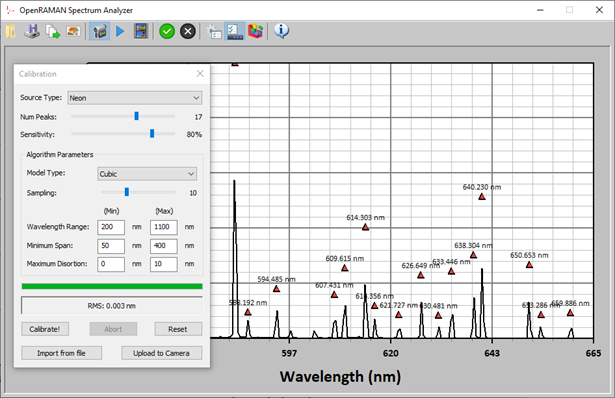
The software, which was initially modest, has grown into a fully functional program suite that covers most of the features traditionally implemented in commercial spectroscopy software. It includes single and live acquisition of spectra, loading/saving and export to clipboard, filtering, baseline removal and an automated calibration algorithm that I specially designed for the occasion. A screenshot of the software performing a calibration is shown in Figure 1.
A specific page was created on the companion website to host the latest version of the software for download. As the rest of the project, the software is distributed under the open-source CERN OHL-W v2 license.
Although the software was designed to interface to the OpenRAMAN spectrometers, it will actually work with any dispersion-based spectrometers using PointGrey camera. It may even work with different camera manufacturers or with CCD linear array as long as you provide a DLL to interface to the hardware. The source code is given with a the DLL necessary to interface to PointGrey cameras, which can be used as an example on how to implement other camera types. The program even support multiple spectrometers connected to the same computer using each a different hardware! I don’t know if that will actually be useful but I made it as flexible as possible to avoid restrictions that would later block some users.
The software will work with either .CSV files or with a custom file format that I implemented using an upgraded version of the technique I presented here. One of the most challenging difficulty I had to face was to allow 32 bits version of the software to load the files saved with the 64 bits version. This seems easy at glance but the original technique I developed do not cope well with that. One advantage of the custom file format is that the files contains the data, the blank and all the program settings (filtering, calibration etc.) so that you can tweak them later.
As explained above, the software also features an automated calibration procedure. You simply measured the spectra of a Neon or Argon-Mercury lamp, give the number of peaks that appears on screen and click on the “calibrate!” button. The algorithm is extremely robust to missing peaks and converge to a solution within a few seconds (4 seconds on my super-old laptop). By default, the algorithm will look on a very broad range of parameters, which basically cover the whole visible region of the spectrum, but advanced user can also tune the settings when necessary.
The software also implements many other features like time-lapsed acquisitions to monitor reactions, automatic saving of spectra, baseline removal algorithm and Savitzky-Golay filtering. The user can also freely choose between wavelength and Raman shifts axis, save and import calibration data etc. Also, the calibration will be saved inside the camera so if you connect the spectrometer to a different computer it will remain calibrated!
I invite you to test the software to discover all the possibilities. You don’t have to possess a spectrometer to run the software as you can import any .CSV file where the first column represents the x-axis and the second column the y-axis.
During the next weeks/months, I will post detailed articles on how the major features were implemented. The first article will be about the automated calibration procedure.
I would like to give a big thanks to James who has supported this post through Patreon. I also take the occasion to invite you to donate through Patreon, even as little as $1. I cannot stress it more, you can really help me to post more content and make more experiments![/p]